
Climate Impact
See what climate hazards could cost a property by 2050 and how much adaptation activities would protect.
Climate Impact turns the climate hazard assessment for a property into money. It estimates the profit at risk by 2050 if nothing is done, and how much of that your chosen adaptation activities would protect. It builds on a Climate & Nature analysis, so set one up first.
This feature may not be enabled for your organisation — ask your tese.io contact.
Where to find it
In the sidebar, open CN Intelligence → Climate Impact.
A short version also appears on each property dashboard under CN Intelligence → Climate & Nature as Financial translation (What does it mean financially?).
How to see the climate impact for a property
Open the analysis you want under CN Intelligence → Climate & Nature, then go to Climate Impact. If you have not opened a property, the page asks you to open it from a property.
Choose the Property at the top if the analysis has more than one mapped area.
Wait for the climate analysis to finish. The status pill shows whether it is being prepared, running or failed.
If the setup is incomplete, the Property setup panel opens on the right. Fill it in (see below).
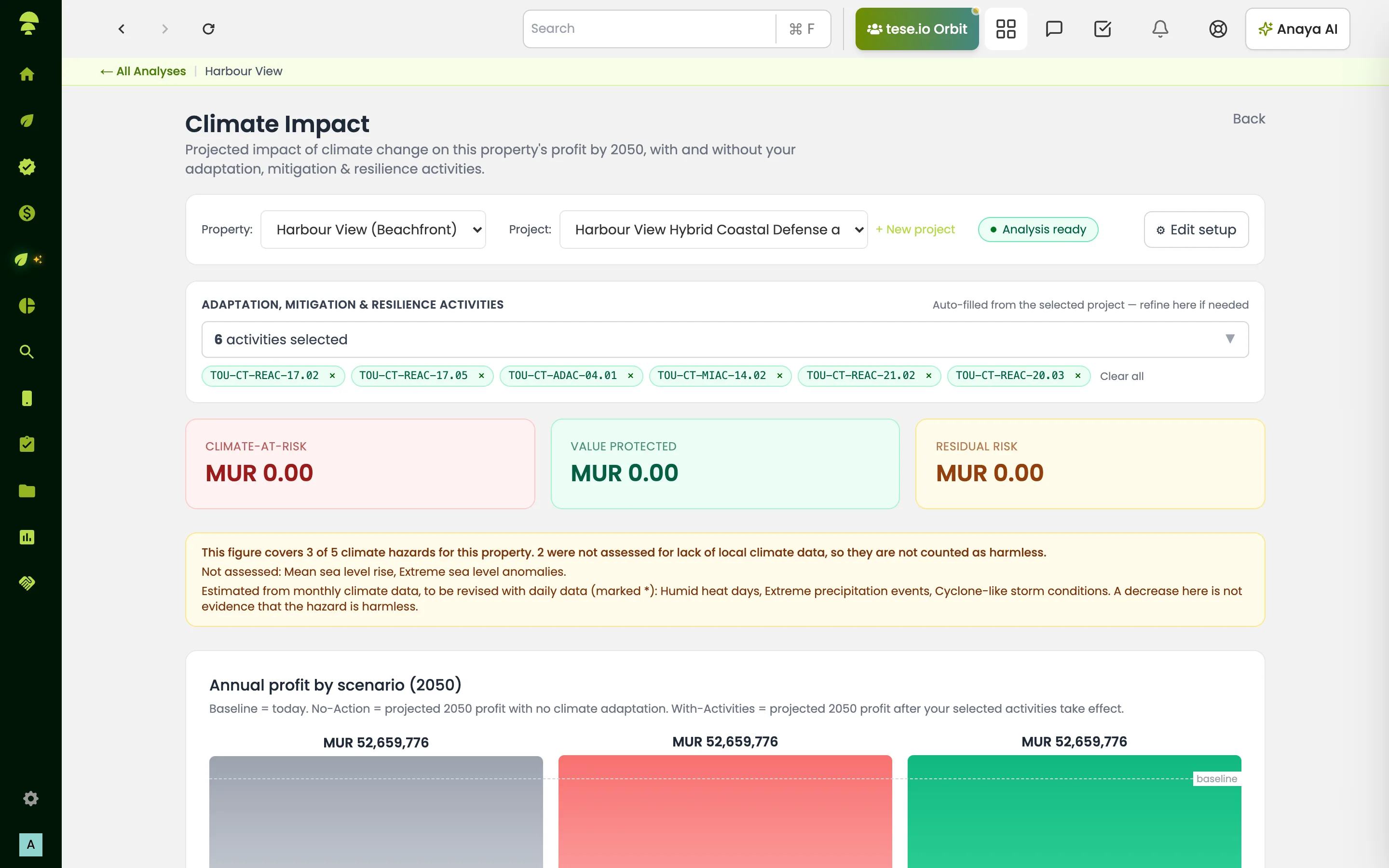
Read the three headline figures:
Climate-at-Risk – profit lost by 2050 if no adaptation is taken.
Value Protected – profit recovered by the adaptation activities you picked.
Residual Risk – profit still lost even after the selected adaptation.
Use the charts below for Annual profit by scenario (2050) (Baseline (today), No Action (2050) and With Activities (2050)), By climate driver (subhazard) and Value protected by activity.
How to fill in the property setup
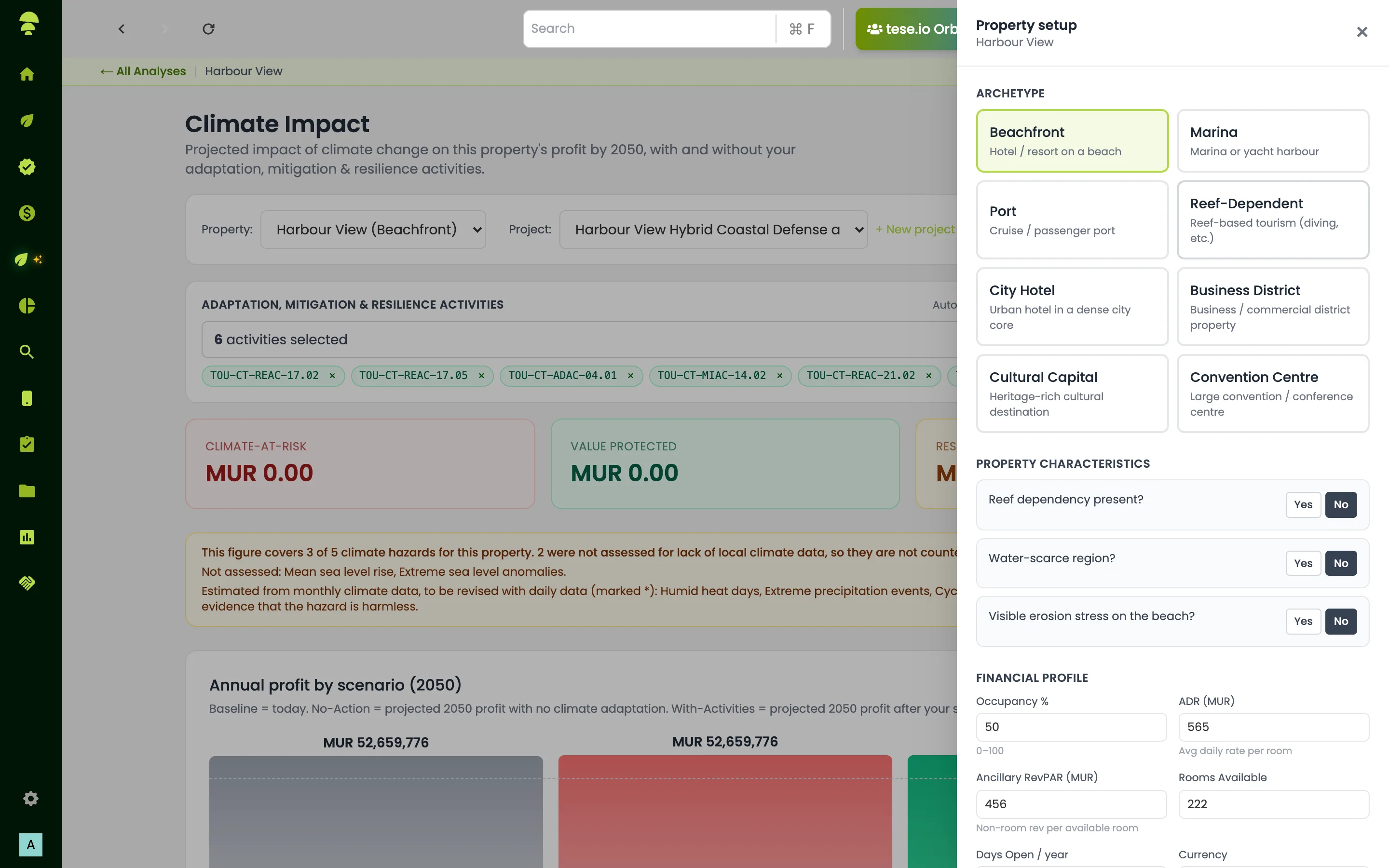
Select Edit setup to open the panel. Changes save automatically as you type, and the figures recalculate after each save. There is no Save button.
What the panel asks for depends on the type of property:
Tourism properties choose a property type (for example Beachfront, Marina, Port, Reef-Dependent, City Hotel, Business District, Convention Centre or Cultural Capital). They then answer yes/no questions about local conditions, such as reef dependency, water scarcity or cyclone exposure, and complete a Financial Profile: Rooms Available, Occupancy %, ADR (average daily rate per room), Days Open / year and Ancillary RevPAR (non-room revenue per available room). Money fields show your currency, for example ADR (MUR).
Buildings set a Building type (for example residential or industrial), the leasable area or number of units, rent, occupancy, the lease structure (such as Triple net) and yearly operating costs. All fields are needed; costs can be 0.
Agriculture properties see projected crop yield impacts, based on the crops and farm size in the analysis profile.
You can also choose the Currency. The page may suggest one based on the property's country.
How to apply adaptation activities
Use Project: to pick an existing project on this property. Its adaptation activities feed into Value Protected.
If the property has no projects, pick activities manually in the activity selector. Value Protected updates as you pick.
To create a new project, select + New project. You will choose solutions, then strategies, then activities.
Good to know
The figures are scenario point estimates, not a loss distribution.
Climate hazards drive the figures. Nature data only provides physical inputs.
Some property types do not have a financial model yet, for example forest carbon. For those the page explains that financial climate impact is not available yet, and points you to Climate strategy and Activities.
If a property type's coefficients are not configured yet, the page says so. Other analyses are not affected.
Common questions
Why does the page say "Open this page from a property"? Climate Impact works on the analysis you last opened. Open an analysis under Climate & Nature first, then return to Climate Impact.
Why is Value Protected zero? You have not picked any adaptation activities yet. Choose a project under Project:, or tick activities in the selector.
Do I need to press save after editing the setup? No. The setup saves automatically and the figures update.
Why does the dashboard ask me to add revenue inputs? Value at risk needs the property's financial details. Open Climate Impact, select Edit setup and complete the financial fields.
The climate analysis failed. What now? Go back to the property dashboard and retry the Climate hazard assessment. Climate Impact fills in once it finishes.
Was this article helpful?
Still need help?
The tese.io team reads every message and usually replies within one working day.
Contact support